Create Notification Channel
User can create two types of notification chanels:
- Email Channel:Sends email notifications when a rule is triggered. Configuration requires specifying recipient email addresses.
- HTTP Push API Channel: Sends notifications as HTTP POST requests to a specified URL. Configuration requires specifying the target URL and potentially authentication details.
Create Email Notification Channel
To create a new Notification Email Channel, do these steps:
- Select Rules & Notifications | Notifications on the sidebar menu to display the Rules screen.
- Select the Notification Channels tab.
- Select the Email Notification Channels tab.
- Click +Channel to display the Create New Email Notification dialog box.
- Enter a Channel Name field.
- Specify one or more Email Recipients.
- Enter an Email Subject in the Email Subject field.
- Click Create to create the new email notification channel.
A screen capture of the Create New Email Channel dialog box is shown here.
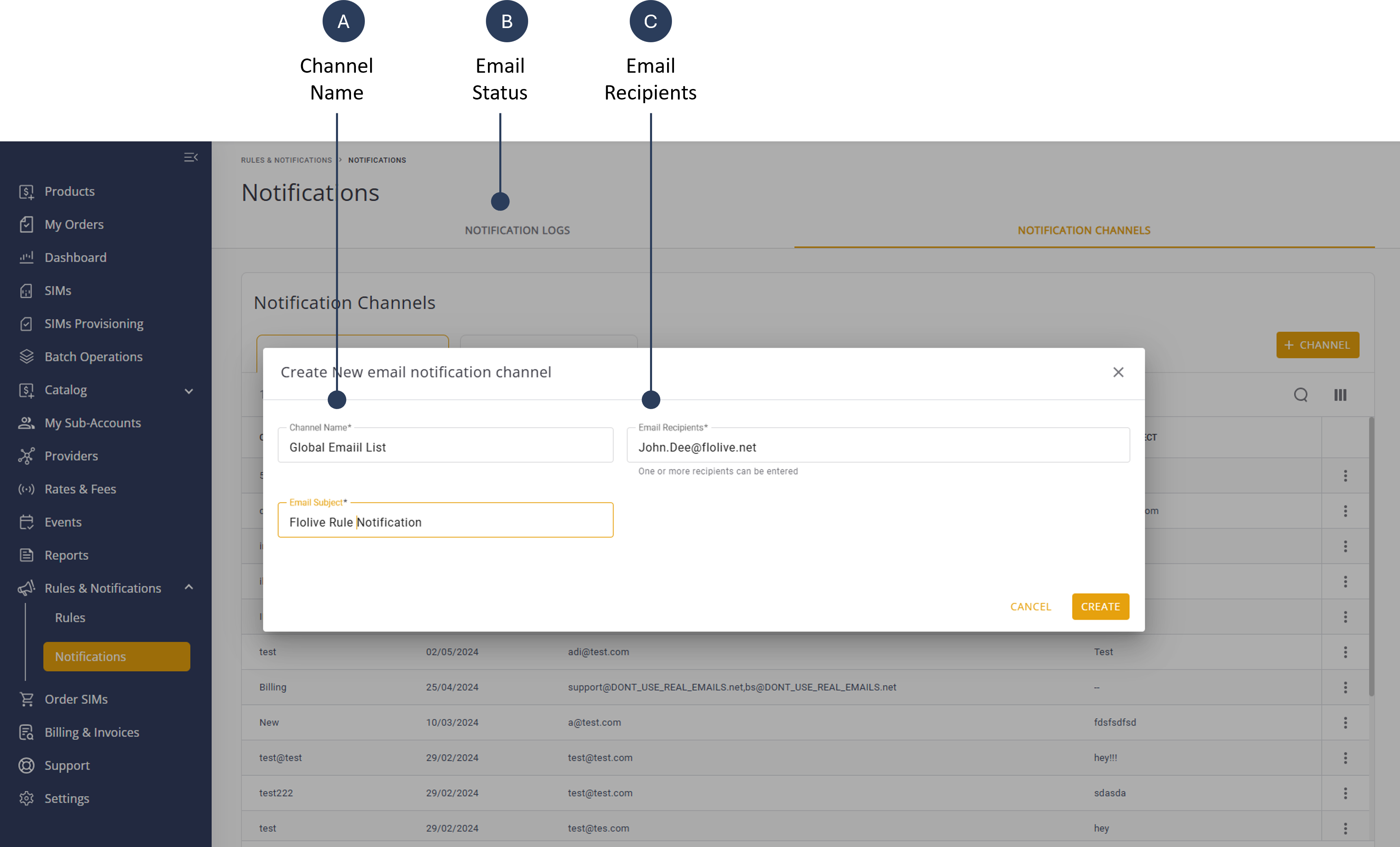
A description of the Email Notification fields is provided in this table.
| Attribute | Description |
|---|---|
| Channel Name | A descriptive name to identify the Notification Channel. |
| Email Recipients | A list of one or more applicable email recipients. Multiple email recipients are separated by a comma (,) |
| Email Subject | The subject of the email that is displayed from this channel. |
Create New HTTP Push API Notification Channel
To create a new Notification Email Channel, do these steps:
- Select Rules & Notifications | Notifications on the sidebar menu to display the Rules screen.
- Select the Notification Channels tab.
- Select the HTTP Push API Channelstab.
- Click +Channel to display the Create New Email Notification dialog box.
- Enter a Channel Name field.
- Enter a Shared Key to define a trusted communication source
- Enter a URL that serves as the endpoint for receiving event.
- Click Create to activate the new notification channel.
A screen capture of the Create HTTP Push API Channel dialog box is shown here.
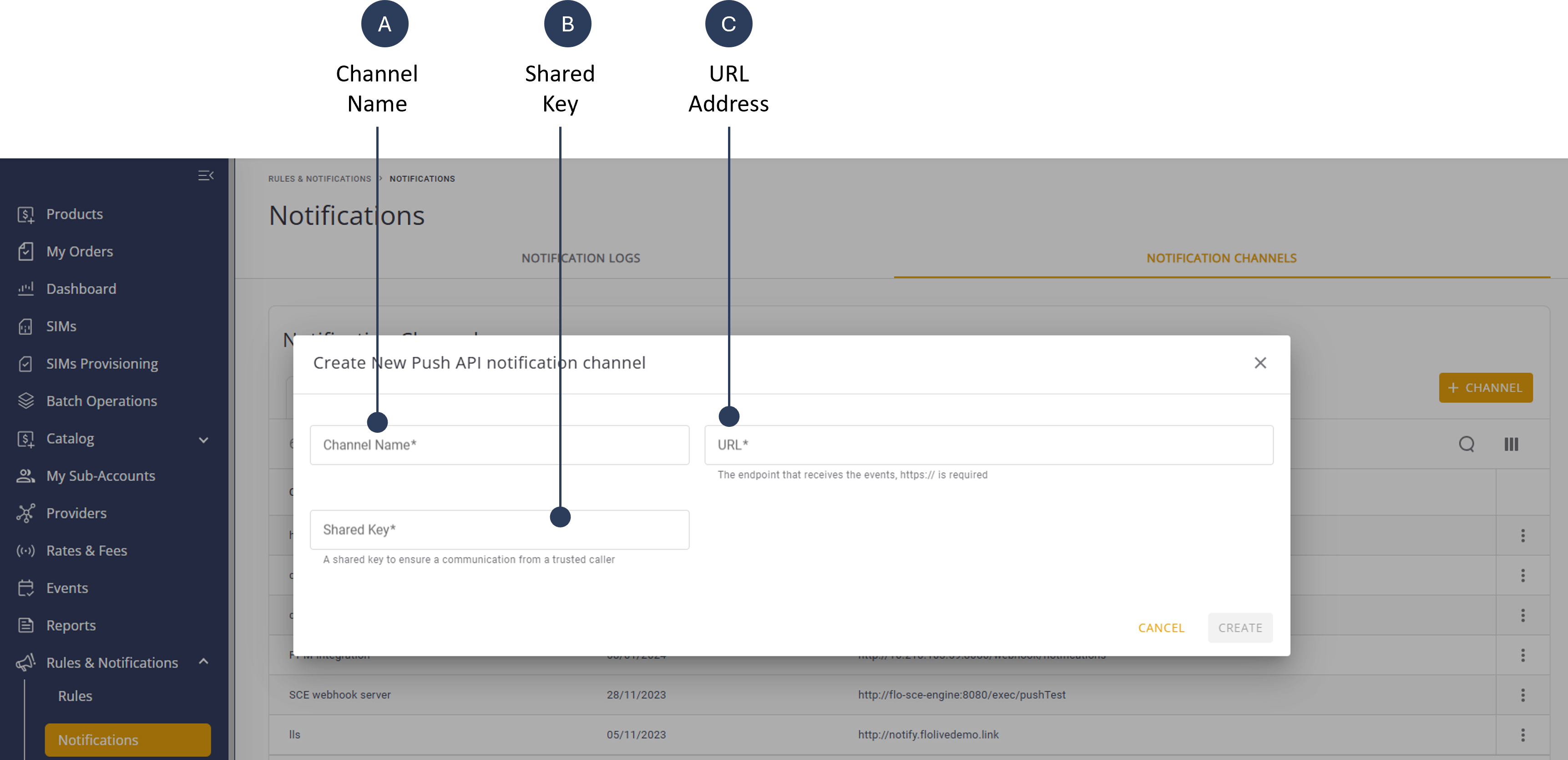
A description of the HTTP Push API Notification fields is provided in this table.
| Attribute | Description |
|---|---|
| Channel Name | A descriptive name to identify the Notification Channel. |
| URL | The target URL for the notification; only one URL is allowed per HTTP Notification Channel |
| Shared Key | A shared key to ensure communication only with a trusted caller; the shared key is acting as a public key to match the connection between a trusted caller (that is, the platform) into the customer URL.To authenticate the message (API + content) coming from the other side (i.e. from the CMP platform), you set the Shared Key value on the portal (as described in the following procedure) and then validate that the message is received with same key. |
HTTP Push API Notification Content Payload
A description of the HTTP Push API parameters is provided in this table is provided in this table.
| Parameter | Description |
|---|---|
| notificationId | The system-generated ID assigned to the notification. |
| notificationSource | The Rules and Notifications module where the triggering rule was created. |
| actionName | The Rule type-Binding type combination (e.g., FirstEventAccount). |
| ruleName | The name of the rule that triggers the notification. |
| notificationName | The name given to the notification. |
| userDescription | The optional description provided for the rule. |
| accountId | The ID of the account containing the rule. |
| accountName | The name or alias of the account containing the rule. |
| iccid | The ICCID of the SIM that triggered the notification. |
| payload | The container of the push notification content. |
| body | The notification body; parameters vary by rule type/binding type. |
| notificationDescription | The message content of the push notification. |
| subscriberId | The ID of the subscriber receiving the notification. |
| threshold | The rule defined threshold. |
| simimsi | The list of IMSIs of the SIM (subscriber). |
| signature | The system-generated signature verifying the "body" response parameters. |
| usedImsi | The IMSI of the SIM that triggered the notification. |
NOTE: The HTTP API Push Notification parameters are common for all Rule type-Binding type combinations. However, the “body” parameters may vary between rules.